EXIF Pro 0.4.11: Run Your Own ExifTool Commands on Android
EXIF Pro 0.4.11 adds a Custom command tab to run any ExifTool command on your photos and videos, live tag search, ExifTool 13.59 and support for Android 16.
On this page
EXIF Pro has always been "ExifTool for Android": the full ExifTool engine, bundled in the app, behind a friendly editor. Version 0.4.11 opens up that engine. You can now run any ExifTool command on your photos, videos and other files, right from your phone. This release also brings ExifTool 13.59, faster tag search, and support for the newest Android devices.
A new Custom command tab
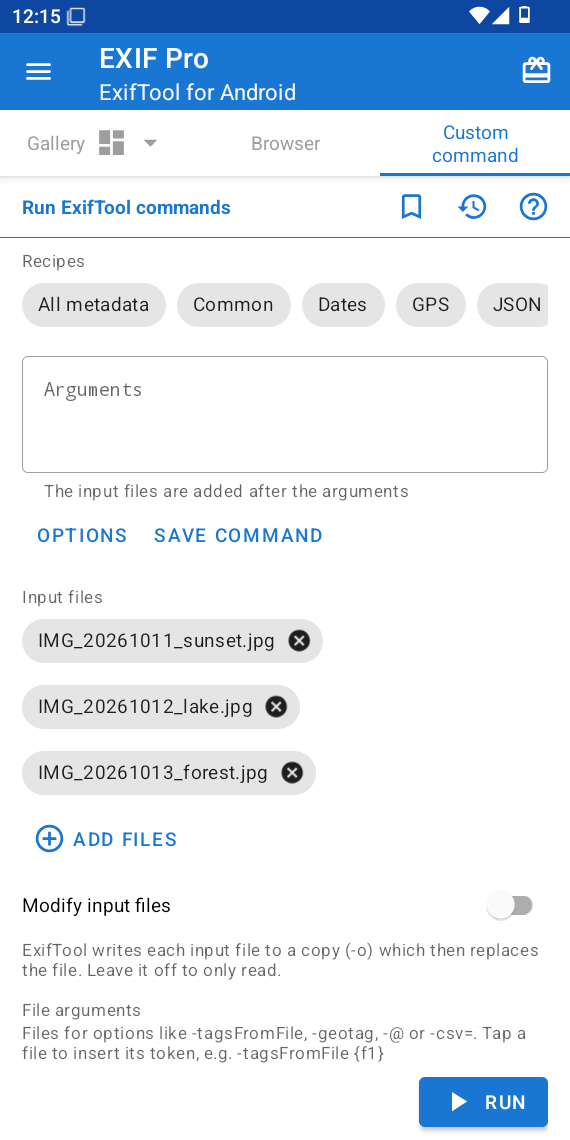
The new Custom command tab, next to Gallery and Browser, lets you type the ExifTool arguments you know from the desktop, and runs them on the files you choose.
- Recipes fill in common commands with one tap: all metadata, common tags, dates, GPS, JSON, CSV, the thumbnail or preview image, the XMP packet, the file structure, and more.
- Options and tag suggestions help you build a command without remembering every flag or tag name.
- Saved commands keep the commands you use often, and History lists the ones you ran recently.
- Input files are added after your arguments. Add them from the system file picker, or straight from the Gallery (see below).
- File arguments pass extra files to options such as
-tagsFromFile,-geotag,-@or-csv=: tap a file to insert its token, for example-tagsFromFile {f1}.
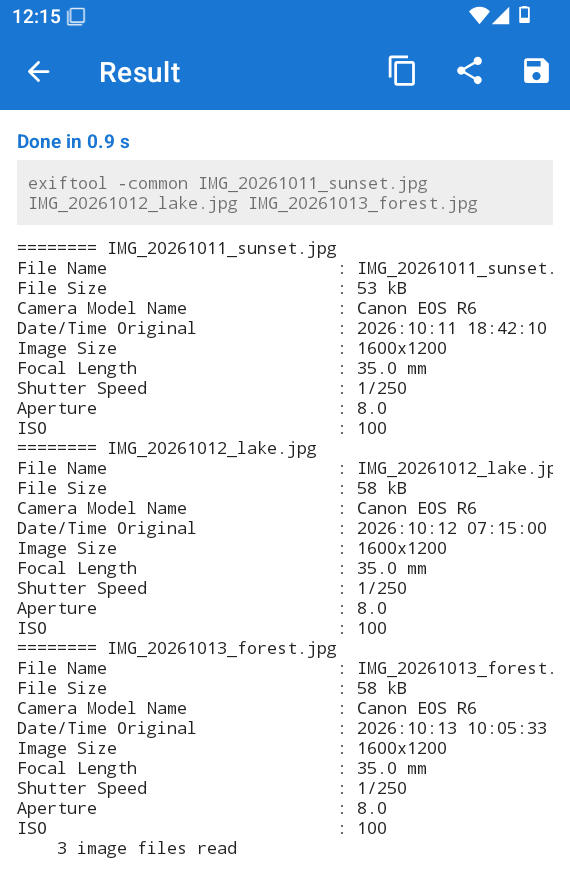
The result screen shows the command and ExifTool's output. Copy it, share it, or save it to a file.
Edit your files with a command
Turn on Modify input files to let a command write metadata. For example:
-Copyright="Jane Doe" -Artist="Jane Doe"
ExifTool writes each file to a copy first, and EXIF Pro replaces the original only when the command succeeds, so a mistyped command leaves your files untouched. The app asks you to confirm before it modifies anything.
Tip: put values that contain spaces in quotes, as in a terminal. Without the quotes,
-Copyright=Jane Doe is read as the tag -Copyright=Jane followed by a file named Doe.
Run a command from the Gallery
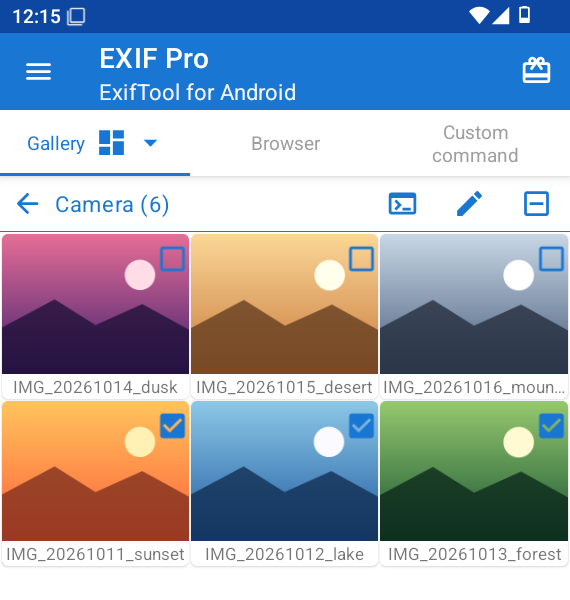
Select photos in the Gallery and tap the new Run command button: they open in the Custom command tab as input files, ready for your command.
Find tags as you type
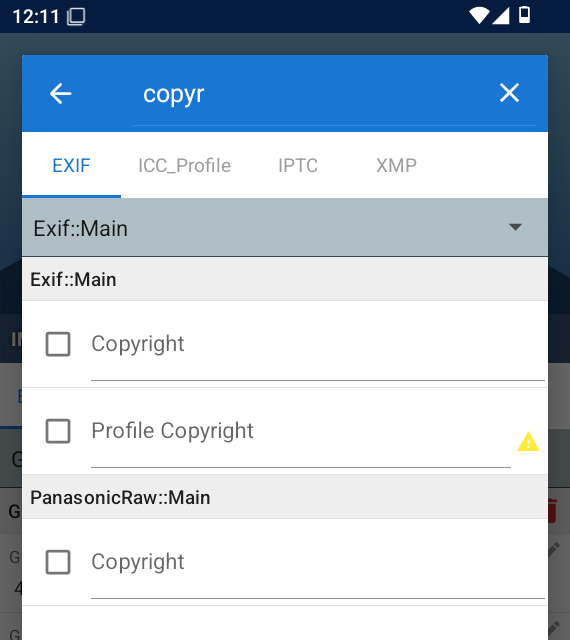
In Add the new tags, the results now update while you type, so you can find a tag such as Copyright among thousands after a few letters.
Your photos keep their location
EXIF Pro now reads the original photos and videos, including their GPS location, and keeps the location when it saves your changes. Thumbnails in the Gallery also refresh after the app edits a file.
A clearer permission screen
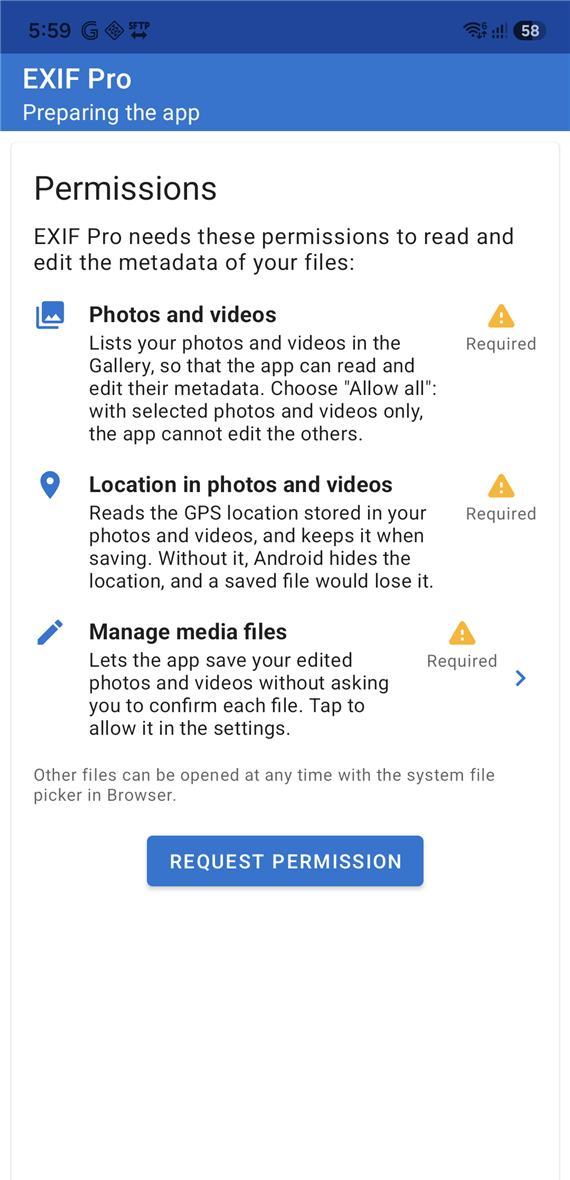
The first-run screen now explains why the app needs each permission:
- Photos and videos, to list them in the Gallery and edit their metadata. Choose "Allow all": with selected photos only, the app cannot edit the others.
- Location in photos and videos, so that Android doesn't hide the GPS location from the app, and a saved file doesn't lose it.
- Manage media files, to save your edited photos and videos without asking you to confirm each file.
In the Google Play version, files other than photos and videos are opened with the system file picker in the Browser tab.
Up to date
- ExifTool 13.59, with its support for the latest cameras and file formats, and an updated tag database.
- Android 16 ready: the app targets the latest Android version, and keeps its content clear of the system bars on edge-to-edge screens.
- 16 KB memory pages: the bundled ExifTool engine is rebuilt for the new Android devices that use 16 KB memory pages.
Get it
EXIF Pro 0.4.11 is rolling out on Google Play. If you have ideas or run into a problem, send us your feedback from the app's menu.
Related posts
FTP Server 0.16: Ready for Android 17 and Much Easier on Your Battery
FTP Server 0.16 is ready for Android 17, keeps running as long as you want on the newest Android versions, and uses far less battery while the server waits for connections.
SSH/SFTP Server 0.12.2: Ready for Android 17, Modern SSH Keys and ChaCha20 Encryption
SSH/SFTP Server 0.12.2 is ready for Android 17, works with Ed25519 keys and RSA keys from current OpenSSH, adds ChaCha20-Poly1305 encryption, and gives every installation its own host key. Key login works again, and the app uses less battery while the server runs.
CamRelay 1.0.6: Deeper ONVIF Support for Your NVR, and a Smoother Web Live View
CamRelay 1.0.6 lets your NVR and ONVIF apps do much more with your phone camera: receive recording and flashlight events, adjust brightness and zoom, and rename the camera. Windows and NVRs now pick up a new camera name right away. The web live view can keep playing in a background tab, and several web interface fixes make everyday use smoother.